

Whenever you receive a text or email that feels off, text us a screenshot or forward the email to ScamProtector. We check the sender, web links, and wording for phishing and scam patterns, then reply in plain English before you click or pay. On your computer, our browser extension also reads website terms before you sign up.
Scam protection that’s just a text away.
Not sure if a text, email, or website is safe? Send us a screenshot or forward the email, and get a plain-English answer in seconds — no app to learn.
- Text a screenshot
- Forward an email
- Browser extension
From $3/month on our 2-year plan · 30-day free trial · Cancel anytime in one click.
The ScamProtector extension is installed in this browser.
+63 917 555 0194 · Text Message
Illinois DMV Final Notice: Unpaid toll of $6.80 will suspend your registration tomorrow. Pay now: illinois-govin.cc/pay
Is this real?
Likely a scam
Why: The link goes to illinois-govin.cc (not a government .gov website), and it was sent from an overseas +63 number.
What to do: Delete the text and don’t tap the link.
Forwarded to check@scamprotector.app
Subject: Invoice #88412 — $399.99 Auto-Renewal
“Thank you for renewing GeekSquad Protection. If you did not authorize $399.99, call 1-888-555-0142 within 24 hours to cancel.”
Scam — Fake invoice
Why: No real charge happened. Scammers send fake $399 receipts hoping you’ll call their fake refund number.
What to do: Do not call the number. Check your real bank statement if unsure.
What a single mistake can cost
$32,600
Average loss for a scam victim age 60 or older
Scammers design messages to rush you. Getting a calm second opinion before you click stops them cold.
Protection that’s easy to use
-
Spot something odd
A text about an unpaid toll, a strange invoice email, or an unfamiliar website asking you to sign up.
-
Send it our way
Text us a screenshot, or forward the email to ScamProtector. Not sure how to screenshot? See our step-by-step guide.
-
Get a plain answer
Within seconds you’ll know whether it’s safe — with the warning signs we found and clear steps on what to do next.
Get protected from scams like these
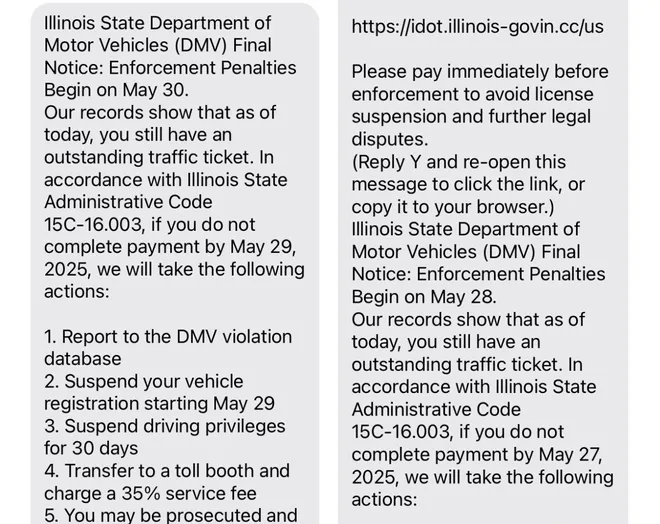
illinois-govin.cc link (not .gov) & “Reply Y” trick
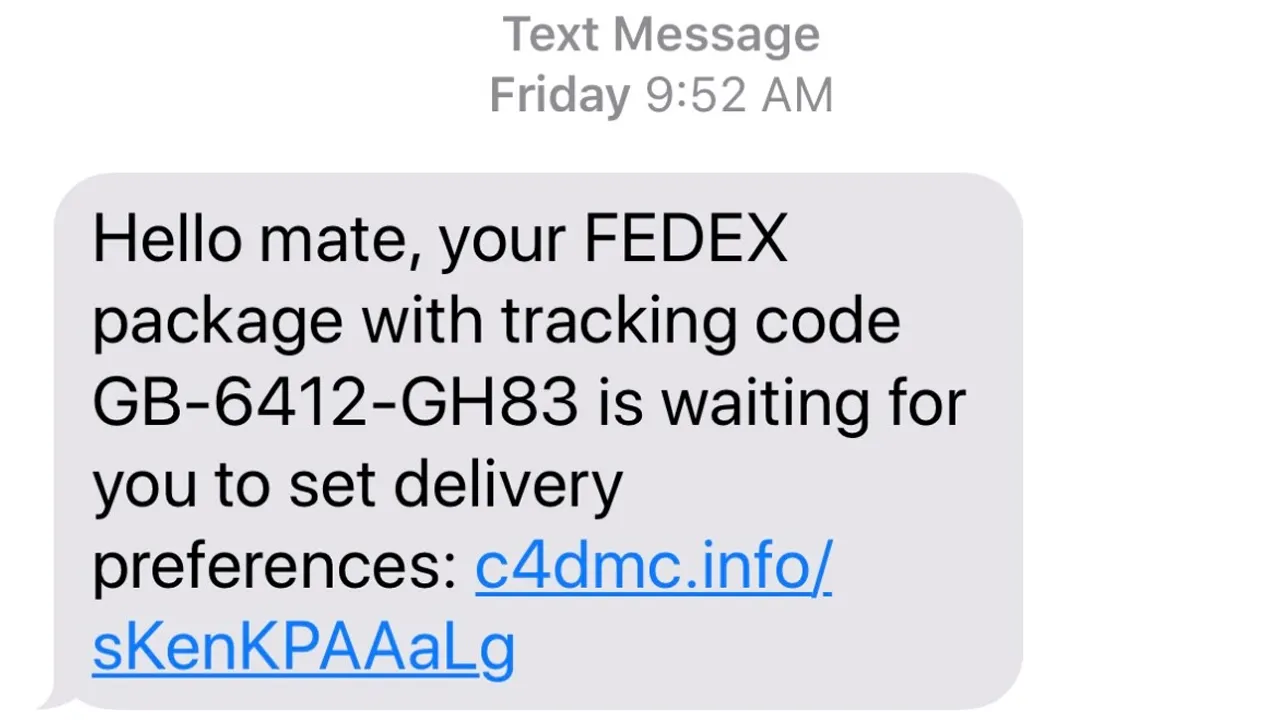
c4dmc.info web address & odd “Hello mate” greeting
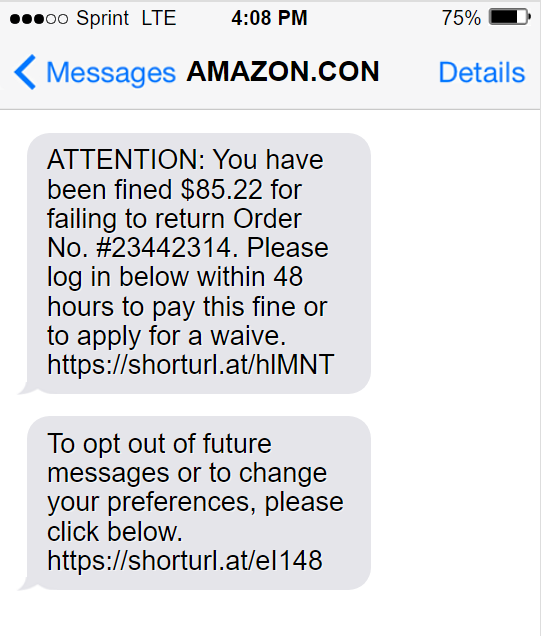
shorturl.at link & fake “$85.22 fine” threat
Three ways to stay protected
By text message
Works on any iPhone or Android phone. Just text us a screenshot of anything suspicious and get an instant answer — no app required.
By email
Suspicious bill, prize, or bank notice? Forward the email to ScamProtector and we’ll reply telling you whether it’s safe — no setup needed.
In your web browser
For Chrome, Edge, and Brave on a computer, with Firefox coming soon. Before you sign up or buy, it reads the site’s terms and flags anything unusual.
See how it works →ScamProtector reads the fine print before you sign up
Every website asks you to agree to pages of legal terms. Our browser extension reads them for you and points out anything unusual, in plain words.
- AI training on your photos
- Selling your data
- Hard-to-cancel subscriptions
- Forced arbitration
It never reads what you type, your passwords, or card numbers. Only the web addresses of a site’s terms and privacy policy are sent when a check runs. Included with every plan. Works in Chrome, Edge, and Brave on a computer; Firefox is coming soon.
Installed in this browser. Members: sign in once and it starts checking.
The Firefox version is coming soon. For now, add ScamProtector in Chrome, Edge, or Brave on your computer.
The extension is for Chrome on a computer. On your phone, your membership protects you by text and email.
2
2 things worth knowing in Snapnest’s terms
1 is worth a close look.
2 things worth knowing before you sign up
Snapnest · Terms & Privacy Policy
Worth a close look
They can use your photos to train their AI.
Photos you upload can be used even after you delete your account.
How to avoid it: Turn off “Help improve Snapnest AI” in Settings → Privacy.
Good to know
Disputes go to private arbitration, not court.
Email their legal team within 30 days of signing up if you want to opt out.
Private by design — we never sell your information
ScamProtector is funded strictly by member subscriptions, never by advertising or selling personal data. Screenshots are checked on the fly and not stored on our servers, and you can cancel your membership anytime in one click.
Choose your plan
Every plan starts with a full 30-day free trial. Cancel anytime before your trial ends and pay nothing.
Best value · Save 70%
2-Year Plan
$3 / month
Billed as $72 every 2 years after trial.
Start 30‑day free trialIncluded in every plan: Unlimited text & email checks · Chrome, Edge & Brave extension · Secure checkout via Stripe & Apple Pay
Common questions
Yes. ScamProtector is built by Multify Inc in Austin, Texas. Our sole business is helping members spot fraud before it happens — we never sell personal data, and you can cancel anytime.
Every plan begins with a 30-day free trial. After that, our best-value 2-year plan is $72 every 2 years (just $3/month, saving 70%), annual billing is $48/year ($4/month, saving 60%), or monthly billing is $10/month.
None. There are no extra fees, text/email checks and the browser extension are all included, and you can cancel anytime from your account.
ScamProtector works by text message on any iPhone or Android phone (with no app to install) and by email whenever you forward a suspicious message to us. On a computer, the ScamProtector browser extension works in Chrome, Edge, and Brave, with Firefox coming soon. Get it from the Chrome Web Store.